





The sound of space.
Apr 23I’ve been a space geek all my life and to me, the big black universe has always fascinated me. Why? Because space is big and full of possibilities. It’s a “space” that is big enough to encompass all the possibilities of “what’s out there” that I can think of.
That feeling of “vastness” is hard to capture in ones mind. The giant black cold void that separates us from everything around is so expansive that numbers cannot capture it. What can is … Music.
As a child, the TV Series “Cosmos” has made an unimaginable impression on me. When I heard the opening tune and the dulcet tones of Carl Sagan, I would be glued to the television, focused on images of stars and nebulae and …. the Music. I was only 7 years old so I didn’t understand what Carl was saying ( I didn’t speak English yet) so what stuck is the fantastic, timeless music of Vangelis. A composer who should rightfully be awarded the honour of giving humanity the soundtrack of the stars.
There are several songs from this soundtrack that have become iconic, timeless pieces, but there is one that captures the vast cold loneliness of the void between the stars .. then “Alpha”. Melancholic, emotional and intense it feels like it is perpetually hummed by out Voyager Spaceprobes as they hurl further and further away from us every day.
So when I found this wonderful cover, performed by Jeff Pearce of the iconic “Alpha”, I knew I had to share it.
Related Posts
Looking back (and forward) at Linux
Apr 21
Since we are on the theme of “Remember 20 years ago ?”, let’s talk Linux. I think it was somewhere in the last days of 2004 I heard about this Linux distribution called “Ubuntu”. I had been dabbling with Linux since the early 2000’s but it never ever “went” anywhere. Distro hopping to find a solution that I could actually use meant valiantly trying to deep dive into some distribution only to back out in a huff of frustration because there would be no way to get the hardware to work or do simple things like play an MP3. Mandriva, Suse, College Linux, Knoppix … many were tried, but none stuck.
Only when I started using Ubuntu, things changed. Suddenly I was introduced to an operating system that not only seemed to work “out of the box” it also came with some third party scripts that would auto install some of the crucial components that would turn this “quirky” operating system into something that I could viably use….
Fast forward 20 years and a lot has happened. I started using Linux in earnest. From running it on my own machines (as a secondary machine), playing with it as a server, using it to resurrect old pc’s, getting it to play nice with old macs AND converting my wife’s then 70 year old grandmother onto linux (and becoming an overnight sensation on the DIGG and having the serverfarm of my webhost go into a chernobyl like meltdown).
Today my infatuation with all things new-and-Linux has mellowed. I don’t try out every new distro and have a hard time grasping why the Linux community, who, back in the days of newsgroups, flamed everyone who asked a “non-commandline question” has become infatuated with producing hundreds of different distro’s who only differ in the configuration of their graphical user interface. The only comparison is can make is that some group of stuffy librarians turned into overcrazed car-tuning gearheads overnight. Suddenly its all chrome, rap music and showing of their “pimped out rides”. This distro craze has taken valuable attention and resources away from developing what Linux really needs: Good applications.
On many occasions I’ve been confronted by another group in the Linux community: The “Freedom” guys who insist that no piece of code should be closed source. From their laptop hardware to the bios, to the operating system and all the applications: It should all be “libre”. Although they make a good point, these “Stallmanites” ( see: Richard Stallman ) put an extra hurdle in front of the further development of Linux. To grow it needs to incentivise cooperations like Nvidia, Canonical, Valve to invest time and resources in the development of software that runs on Linux so people will actually use it.
Today Linux is still interesting to me. Maybe not so much as a desktop, or as a “geeky alternative” to the mainstream, but as an interesting tool to increase the efficiency of my work. Using scripts and interesting applications (either in a command line or graphical user interface) to get my work done faster still gives Linux its allure.
In light of that I have switched over one of my laptops to Linux to rediscover the “state of Linux” not by trying out some exotic distribution, but relying on a rock solid codebase and using a graphical interface that doesn’t get in the way. With plenty of things working in a browser and just a few applications that are not directly available on Linux, the question of “could Linux be my daily driver” is once again preying on the little free time I have.
We shall see how we fare in the next couple of days with my experimental little machine and try to deduce the power and added value of linux in my daily workflow.
Who knows … The penguin might return for real..
Related Posts
Remember blogging?
Apr 21
My Gmail inbox, a wasteland of forgotten times, got an interesting email today: A congratulatory message from LiveJournal, telling me it had been almost 2 decades since my first post. … Two decades? I hopped over to Knightwise.com to investigate and did find out that indeed, in 2004 i scribbeled down my first thoughts during those exciting web 2.0 days. …
Blogging! Never before was it so easy to gather your thoughts and slam them down on a webpage, the modern day equivalent of doodling your hopes and dreams onto yellowed diary paper. A time when most of us were still hiding behind the anonymity of an ICQ account number (well, maybe not) or an original internet-handle on MSN messenger like CompuGot69 or god forbid, Knightwise.
Give a man a mask and he will show you his true nature. Whoever came up with this quote was (Machiavelli ?) was a very astute connoisseur of human nature. If i browse back to some of the blogs I read back then (and read back what I posted myself) I sometimes wonder if it was wise to put all that out on the internet. But blogging was cathartic, just like journaling. Writing down your hopes, thoughts and dreams and putting them out there (anonymously in front of strangers) was liberating. I was going through a difficult time in those days. My dad had passed away and my family was in turmoil. Babylon was burning and every day during my lunchbreak I would log into this little bubble on the internet and write up what was going through my mind.
Gradually this daily diary evolved into a more technology oriented website where I chose to share my fledgling encounters in using technology to “work for me”. Only after a few years did Knightwise.com really become a “brand” with a clear mission and a growing audience. The little online diary had become a .. product.
And I have had many a good time thanx to this little website. Opportunities have opened up for me, I’ve met interesting people and made friends for life. But the last couple of years, mainly because of my dayjob (that involves online marketing and branding) Knightwise.com has felt more like a “product” i needed to produce for an “audience” and has strayed far away from what it originally was: A diary about how I live with technology.
I wonder if I would ever be able to go back. If I would ever choose to disclose those inner most thoughts and feelings to the world. The changing nature of the internet, the loss of anonymity and the size of my digital footprint would most certainly lead to the words of “Knightwise” coming back to haunt me in my real life.
But what I do know is that “livejournal” told me a valuable lesson: How to express myself in a way that people would find interesting. I learned how to reflect on and organise my thoughts and feelings into blocks of text people wanted to read. But the most important thing was : I didn’t care if anybody did. I wasn’t hunting for likes, looking for comments or waiting for feedback. I just did it for me.
So maybe there is an “inbetween”. Where I talk about tech and how it influences my life. On what projects I dabble in and what new insights I’ve gained. To come back from a “brand” that needs to follow a “format” and bring back some of the “personal” into the digital.
So as I ponder the new Knightwise.com mission, this too becomes another factor of the new way I want Knightwise.com to feel: More like a “blog” with a “theme“ and less like a brand. I make brands for a living and Knightwise.com is my little getaway where I can leave work behind and go do something else. So it might be chaotic, inconsistent and everything that I would frown upon between 9 to 5. But .. That .. is life on the edge of real and cyberspace.
Related Posts
Crawling back on the wagon.
Apr 12
It feels like ages since I’ve been here. Pounding out words on a keyboard and sending them up to the internets. Well, I guess that is life, right? Sometimes things get “in the way” and before you know it months fly by and you haven’t touched your blog at all. Shame really. Especially considering this year marks the 20th anniversary of the Knightwise.com website (there were some proto forms before that that, but those were built with Frontpage or Dreamweaver. Well as long as it doesn’t have an RSS feed it doesn’t count, right ?
Funny thing, writing about technology. In those two decades (that count as millennia in tech-time) a lot has changed. Technology has gotten faster, more ubiquitous more available and easier to use. Yet the things I create with technology have slowly declined. My creative exploits that used to dot the internet like bright colored splashes of paint have become rarities for when I find the time, the urge or the inspiration. I wonder what is causing this.
One of the reasons is that the original “Knightwise.com” mission needs to be redefined. Somehow finding ways to tie multiple platforms together, trying to span the digital ecosphere as a “cross platform geek” is slowly becoming irrelevant. Yes, open standards are still important and we should be aware of being “locked in”. But get a webbrowser and a cloud service and you can pretty much do anything on anything these days, like running Doom in a bacteria.
So I have been ruminating about my new mission, about the new direction Knightwise.com should take and have found the answer in the very thing holding me back from creating stuff in the first place: Technology. Over the last two decades, the abundance, ubiquity, complexity and connectivity of technology has created a source of static hiss in my head, dissolving ideas before they can become reality by pounding them to grit with notifications, distractions and never ending scrolling screens filled with muck and doom.
It might sound gloomy, but this digital mulch that has become my daily reality is starting to foster the seeds of a new beginning. Of a new idea where I stay true to the original mantra ‘let technology work for you’ but slowly decompose the “cross platform geek” to make room for something new.
I’ll keep you posted….

Related Posts
HackerPhone!
Jul 08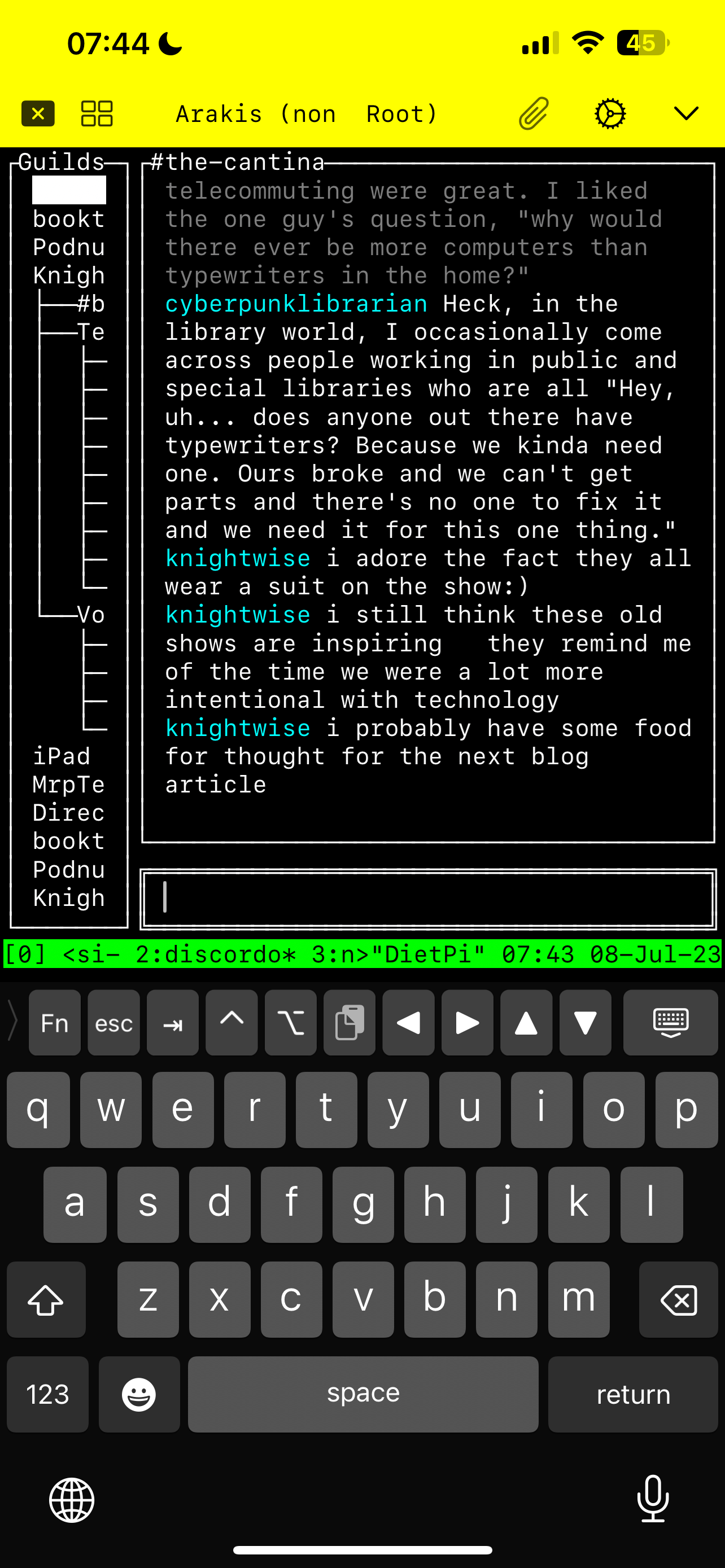
In my last blogpost I had been pondering the idea of a « Lightphone » where I was specifically looking for a phone that would allow me to consume podcasts, navigate and communicate if needed.
One of the reasons the Unihertz Titan jumped out at me was because of its rugged interface and the fact that it would be pretty awesome to use as a « terminal » instead of a phone, allowing me to interact with the various command line applications I have. I thought it would be cool to use it to SSH into my home server and use all my « low distraction » apps.
I decided to « try before I buy » and not start throwing out cash and getting yet « another » device, but instead see if I could pull it off with the gear that I have.
I went for a « copy paste » of the way I SSH into my Linux machine at home on my iPad. Using the SSHelfish app you can predefine connections, execute commands upon connections etc. Basically it slides you into your terminal session with one tap on the screen. I installed it on my iPhone (the payed version of the app is worth it » and took it out for a spin.
Hacking at the hairdressers
Waiting at the hairdressers was the perfect opportunity. Instead of scrolling through the « apps » on my phone, I « logged in » to my home server and picked up the Terminal session I had open. Using Tmux I flipped between the different apps I have open (Toot for Mastodon, Tuir for Reddit, Discordo for Discord and Newsboat for RSS) and puttered along. My hairdresser was getting a little worried since the stuff he saw on my screen reminded him more of a hacker doing his thing, than an average joe scrolling Insta.
It’s harder to use, so its easier to focus
My first impressions on this way of working were mixed. The fact you have to « connect » makes it more « intentional » to « check your socials » than by just using the apps on your phone. You are less prone to getting sucked it because it takes more focus to navigate. There are no pretty pictures to « entertain » you and keep you scrolling from one dopamine hit to the other and, because of the small screen, you only have one app open at a time.
This has an upside. Because its a more focused interface, you don’t tend to scroll aimlessly. The downside is that there is no way to (easily) watch or upload media, like pictures in your Toots or posts, for that you still need the apps. As a workaround I still keep the Discord and Mastodon apps on my phone, but just not on my homescreen.
This is of course all just an experiment but my first impressions are pretty interesting. It’s a different way to interact with my « social feeds » that makes them a little less « distracting » and make me feel more « in the moment » when i’m using them. Another small step towards intentional computing I guess.
Links
The app : Shellfish (ios)
Related Posts
Thinking of a « light phone »
Jun 30
There are 2 kinds of phones: The Smartphone, those highly addictive pieces of glass we carry around in our pocket, that keep us glued to the screen and are the source of many hours of entertainment, games, text messages, videocalls and more ( oh yeah, and sometimes people actually « call » you ) and the « Dumbphones », classic communication devices with numeric keyboards that are mostly geared towards « calling » people and where typing out a text message requires a certain amount of patience and muscle memory that if you want to learn how to do it, you need to look for any cave paintings in the area that depict this.
NoSurf!
Those Smartphones are highly addictive. We spend hours scrolling the net and social media sites, and this has led many to re-think the way we interact with these devices. We do not control them, it is like they control US. Rows of « phone zombies » on the train or waiting in line can attest to it. That is why the #nosurf movement (who wants to re-capture the moment by stepping away from your phone) goes towards a dumbphone. A silly flip-phone in your pocket that is so boring, you only use it to call 911 when you are on the brink of bleeding out.
Lightphone
But what if you realise that having a « dumb-phone » just does not fit your connected lifestyle anymore. A lot of the services we use today require an internet connection (Music, Gps etc), the same internet connection that pumps social media sludge into our brain like its Soylent green. So isn’t there an in-between? A device that allows us to « connect » without becoming an attention-sinkhole? I went on a quest to find out.
Multiple candidates
Immediately I was drawn towards the Unihertz Titan and Titan Pocket. These devices remind me strongly of my Blackberry. A small, rugged and portable device that was ideal for communicating but sucked at webbrowsing or doing any of the internet stuff with a high-visual-octane. The smaller screen and the handy keyboard is very alluring. But the size of the Titan (the pocket is smaller but also has a smaller keyboard) and the poor android support (Android 11 on the Pocket, 10 on the Titan) might speak against them on the long run.
Jelly
Another weird little device on the Unihertz website is the Jelly. A 3 inch android smartphone that is so tiny, you wouldn’t even WANT to surf on it for hours on end. One way to still be connected without suffering from a screen addiction is to downsize the screen? The downside is that using this device for any kind of GPS would require reading glasses with a high perscription
Neuter your Smartphone
The last alternative of course is to « dumb down » your existing phone. By restricting apps and access it is perfectly possible to « scale down » the digital possibilities of your phone to give you JUST the the things you need. This does require a fair share of self discipline because you can easily « switch your phone back to full addictive mode » at the press of a button.
Not quite there yet.
Looking to make your Phone less addictive and more ‘productive’ is more of a thought exercise. I’ve started to figure out it is less about the hardware and more about the things we want to DO with it. Having addictive apps on your phone is a matter of what apps you allow, not what your phone can (or cannot do). I’ve recently moved things like Vinted (I can search for Retro Transformers for hours on end) to my iPad and haven’t used it since. So maybe the same can go for other apps. I need to re-baseline the smartphone I have and determine what I want it to do for me. And if that answer differs in different situations, then maybe I need to start using different profiles and settings to « transform » that black slab into something that does what I need it to do at that moment.
It all comes down to you
In the end? It all comes down to us, the user. We decide how we spend the « attention calories » of our day. Scrolling aimlessly on 9gag or writing up a blogpost that goes around the world in 50 minutes. That is up to us. Our devices enable us to do a great many things, but the way to fight the attention economy might not be with MORE hardware, but with a re-thought approach on how we want to use the technology we already have. So let’s veer away from the umph-teenth Youtube video on some new gadget, keep the money in our pocket and start thinking like like « smart » geeks.
Related Posts
Looking for the edge.
Jun 27
Whenever you think Knightwise.com the tagline must somehow stil ring in your head « On the edge of real and Cyberspace ». And with « the edge » I don’t always mean the latest, newest or hippest techno hype that is going around. It shouldn’t always deal with the arrowhead of digital progress, it might also be « The Fringe ».
Having ridden the crest of the WEB 2.0 and Social Media revolution, witnessed the rise of the cloud and the dawn of big tech, I sometimes find myself in a world where everything feels « mainstream », where everybody is using the same tech, has the same phone and does the same things on the same platforms. Where the excitement has petered off and the internet has become « boring ».
Looking for an edge
So I look for new « edges » to discover. Fringe technologies and platforms that hardly anybody knows. Places that are of the beaten path about to break new ground or fizzle into nothingness.
And opposed to the hords of streamers and podcasters that want to « make it big » and pull in huge numbers and make the big bucks, I’m loving the small engaged community of readers, listeners and contributeurs I have today. I’m not looking for a stage, I’m looking for a campfire.
Misplaced Nostaligia
Maybe it’s misplaced nostalgia, looking for a tech-scene that wasn’t so mainstream. Where you don’t hear about everybody and their dog spouting an opinion over AI … Where you mention some term of tech and people say « What the hell is that ».
So let’s discover that edge together: Throw up your suggestions for some app, tech or platform that nobody knows about and hardly anyone follows. Something new, nerdy and plain weird, because .. we like that kind of stuff. Because there is nothing more exiting then … Living on the edge.
Related Posts
You’ve got mail .. from the 15th Century
Jun 25I love a good paranormal incident, I love history AND I love retro computers. Would there be anything out there that would combine all these three interests? Funny you should ask because .. There is.
The Dodleston Messages (also referred to as The Dodleston Files) is a bizarre series of paranormal events that involve an economics teacher and his girlfriend, a small cottage in the English countryside and a BBC Micro computer that is operated by him, somebody from the past AND somebody from the future.
It sounds bizarre but it makes for a fascinating story where « emails » (or text files) appear out of nowhere on an (unattended) BBC Micro computer, accessible (throughout time) to all three parties. What follows is a strange but interesting back-and-forth between all three « timezones » with some interesting twists.
Spam from the past man!
This day and age you would think « worm » or « mallware » when stuff starts to appear on your computer without you doing anything about it. But this is the 80’s and the BBC Micro is in no way connected to the internet because it doesn’t exist yet. The messages just « show up ».
Moving chairs and stacking cans
Along with the digital correspondance there is also some good old « analogue » paranormal activity with furniture being rearranged, things written on the wall and cans being stacked. But the paranormal entity is far from an evil poltergeist. He is a well mannered softspoken gentlemen called Thomas Harden who compliments Ken on his nice girlfriend ( What a fine woman thou hast) and his house full of cool gadgets (one of them being the ‘looms of light’, his wording for the BBC Micro computer as it manifests itself in his time).
Read it straight from the horse’s mouth
The ‘Dodleston Messages’ have been covered on many blog, website, Youtube video and even on a BBC documentary, but the best source is possibly Kens own book ‘The Vertical Plane’ where he describes the whole story in detail, including the transcripts from every message sent by ‘Thomas’ and the mysterious entities in 2109 . The book is hardly obtainable anymore in print form Here is the Amazon Link but you can also have a look over at (cough) Anna’s Archive but just don’t tell anyone.
Related Posts
On Tunnels and who we trust.
Jun 23
Do YOU use a VPN? It’s a question you hear a lot from time to time. VPN’s used to be for people who wanted to tunnel back to the office to access a boring spreadsheet on some slow fileserver or print their daughters birthday invitations on the company dime. It used to be about tunneling « in ».
These days most people use a VPN to tunnel « out » of somewhere. Vpn’s have become commercialised services with beacons somewhere in the cloud where we all connect to. Promising us privacy and anonymity from whatever snoops might prowl the network we connected to. But what do we have to hide, who do we hide it from and who do we share it with?
So where do I use a VPN
Well, that all depends. Whenever I need to connect to a « foreign network » I consider using a vpn tunnel. And with « a foreign network » I mean one where I don’t have the admin password of the wifi router.
Public Wifi’s are like public urinals
A shared wifi hotspot in a coffee shop (which I seldom use anymore) is a place where I definitely try to use a VPN to obscure my traffic. Although I have to say that I’m more worried about some hipsters malware infested Windows 7 machine giving my machine computer-gonorrhea across the local wifi network. I feel like i’m putting my donut on a urinal so… Shields up.
Corporate IT networks with Nosy neighbours
Ah, those sweet networks managed by overzealous IT staff at corporate offices. I DON’T TRUST THEM. If I have to hop « on their network » to do my thing, I am always careful to make sure my outgoing traffic is obscured. All of it. I don’t feel making my network traffic the passe-de-temps of some 20 something junior IT sysadmin who loves nothing more than snooping logs (or get those logs thrown in my face as part of a shitstorm during a payment issue with a client). No way.
So who do we trust ?
Well, that is a hard one isn’t it. I’ll never go for one of those commercial-but-free services that they offer. The business model here is that they sell off your traffic to advertising agencies. (When you don’t pay you aren’t the client, you are the product). But the « payed » services are kinda the same. Sure NordVpn has quite a good reputation but … in the end i’ll trust my own home network and tunnel out from there via my ISP .. just like with all my other traffic.
So I take the Space SSHuttle
There are a couple of VPN services you can self host. They give you the added joy of connecting to your home network. I’m an avid user of Tailscale to interconnect my devices over the internet (Check out the podcast episode I did on that), but when I want to tunnel ALL my traffic including my DNS queries I resort to using SSHuttle and use a machine running Tailscale at home as an endpoint. Yeah I know, that’s double encapsulation and that might give me some slower speeds, but what do I care .. the guest networks i’m on have money to burn.
T.N.O. ?
Trust no-one. Very true. But its not practical to set yourself up like Edward Snowden and only use your computer with Tails and Tor and hiding under a blanket (tried it, it gets very hot). At some point you have to trust somebody. In my case I draw the line at my ISP because thats where for me security and practicality balance out. At least I don’t have Hipsters licking my firewall or IT-Wanna-Be-Snoops snickering at my URL traffic.
Links
Podcast: Tunneling with Tailscale
SSHuttle (Available on Windows, Mac, Linux and in WSL)
Related Posts
Toot Toot Tui
Jun 22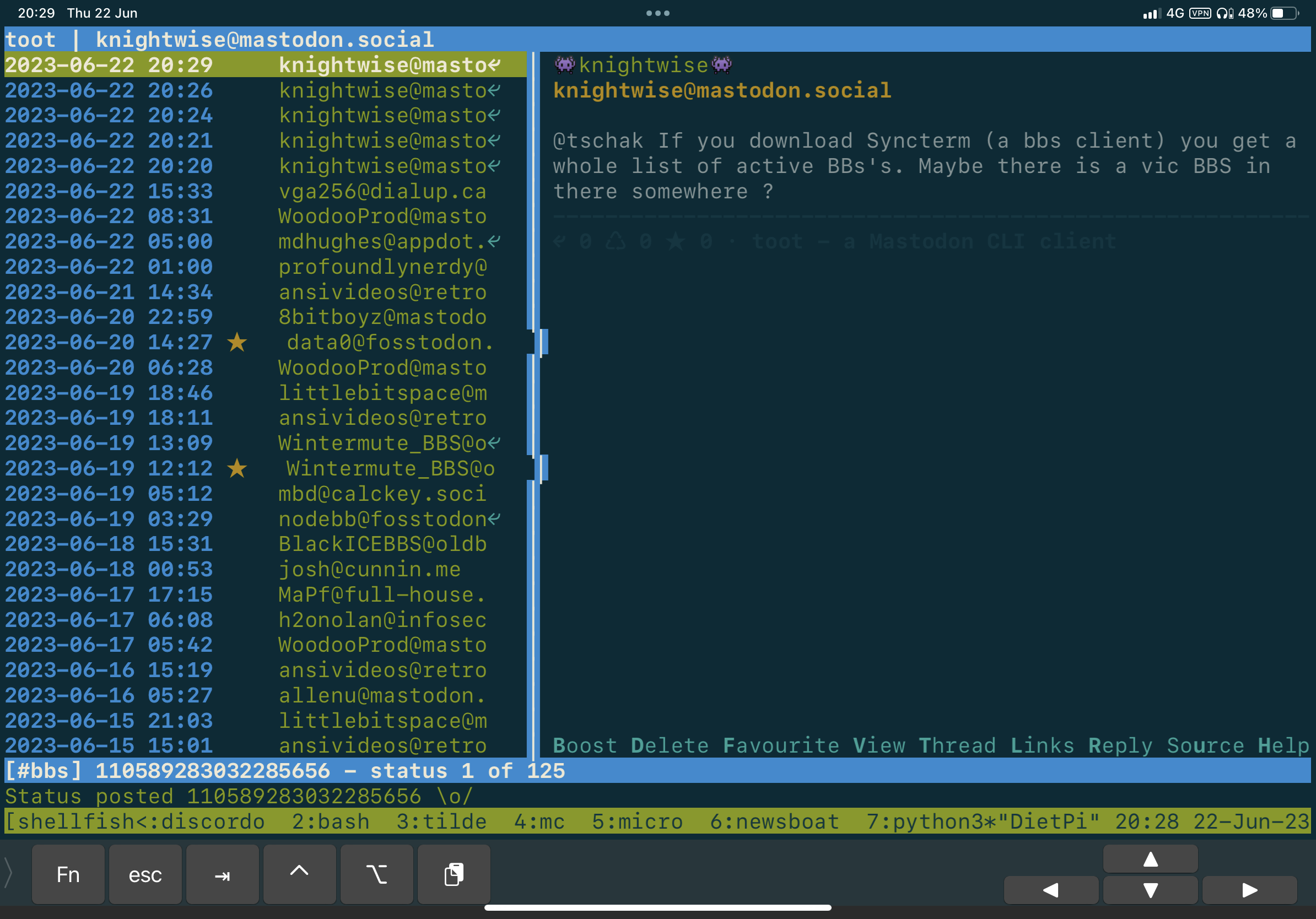
A rainy day on holiday secluded in a tiny village in the Jura mountains in France is the ideal place to pucker around with applications that don’t require a lot of bandwidth. Why? Because I have one bar on my 4G connection and i’m a huge nerd with love for command line applications.
So time to slap another app to the collection of command line apps I have running: Time for ‘TooT’: A TUI (Text User Interface) based client for Mastodon. It’s slick, simple and fast and I can access it from anywhere. All I need is a terminal connection to my home server and I’m good to go.
So why the crap do I go for TUI apps in the modern day? Easy: They are distraction free. You don’t end up scrolling for hours watching silly cat pictures or selfies of wannabe Instagram Models. Its a bit more basic. I do the same with Reddit (using TUIR), RSS (Newsbeuter), Discord (Discordo) and Irc (Irssi). It’s faster to work with (mostly), less addictive (slightly) and most importantly: you look like a Hacker 🙂
Check out the Github page here.
Find the super easy keyboard shortcuts here.