
"w" The shortest command line command … ever.
May 15Some Linux commands are hard to remember. Its a matter of “use daily or forget about them” or plastering your office walls with cheatcheets of your favorite terminal commands. The one I stumbled upon yesterday was in fact a little easier to remember.
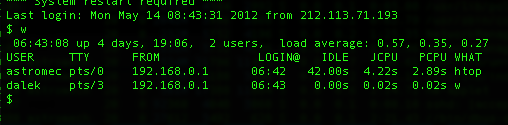
Picture this : you have a home Linux server (or one at work) with several users logged in. One of the things you might want to monitor is who is doing what at this very moment. As I mentioned in a previous podcast about my home setup , I have a Linux system parked “outside” my home network to be accessed by friends and internet buddies. One of the things I do like to keep tabs on is : Who is logged in and what are they doing ? In the old days I would go ” tail -f /var/log/auth.log ” to keep track of the auth.log file that writes down all that is going down on the system. These days i just type “w”. And that’s it.
“w” gives you an overview of who is logged in and what they are doing. Its THAT simple.




I always put a few one character aliases in .tcshrc
[MBP] ~% g alias .cshrc
alias c clear
alias p pwd
alias m more
alias g grep -i
alias l ls -alh
alias s source
alias f file
alias k kill
alias n netstat -n
alias P ps auxww
That’s one school of thought. IBM make a midrange server which most people know as the “AS/400″ (but which has also had many other names in its 24 year life) and it has a command naming convention which I say trumps the “short is best” approach.
It uses three-letter or sometimes single-letter abbreviations for every verb. To “work with” stuff, it’s “WRK”. To copy stuff it’s “CPY”, to delete stuff it’s “DLT”. To display stuff it’s “DSP”. Then there’s an abbreviation for every noun. An “object” is “OBJ”. A file (generally a database table) is “F”, a user profile is “USRPRF” (yeah, so it’s a two-parter). A program is “PGM”.
So all you need to do is put together simple sentences. DLTPGM deletes a program. CPYF copies a file. DSPOBJ displays detail of an object. And so on. The beauty of this approach is that you quickly learn most of the verbs and nouns available and you can start to try commands just by making a new sentence. Sure, sometimes such a command doesn’t exist – WRKPGM for instance – but if it does, you’ll know what it’s called.
There are some attributes also expressed in 3 characters. “WRKOBJAUT” is “work with object authority”, for instance. No command is more than 10 characters long. Most are 9 or less. One facet that took me many years to appreciate is the difference between “delete = DLT” and “remove = RMV”. It’s actually quite simple. You delete a whole, you remove a part. Again, once you know this, it all just fits together.
After over 20 years on the platform there’s not much new I use on a given day, but for many years in the beginning I was often able to “have a go” at a command I had never used before because I could imagine it might exist.
And then it goes further. Wondering what all those parameters need to be? Easy. Type the command on the command line and press the F4 key. You get a full prompt of the parameters (including hiding some until they’re appropriate) with a list (or description) of the valid values for each and a descriptive text. All system-supplied commands also have full help text a simple F1 key away. And that’s help per parameter and for the whole command.
One of the reasons the Unix command line is so geeky is because you have to know all the esoteric commands and their often more mysterious parameters. Sure there are MAN pages, but I’ve used systems where those have been incomplete. And of course every single Unix flavour has its own variations on even some of the basic commands.
The AS/400 empowers all its users by use of its mnemonic approach and assistance always just a key press away.
The “w” command? Is that who or what or why or when or write or window or wookie?